Reviewing Ultimate Hacking Keyboard (UHK)
First impression of Ultimate Hacking Keyboard (UHK)
Happy new year and my UHK v2 keyboard just arrived at my front door on new year eve as a big surprise! If you are looking for the best re-programmable keyboard on the market, just stop searching and go to their UHK website to order one immediately because I have done tons of research on those re-programmable mechanical keyboards and it may take a year or two to arrive like the one I ordered last year in the middle of January 2020. If you are wondering why you never heard about this brand and the shipping time is ridiculous, the short answer is they have issues with their supply chain and currently they only produce 50 keyboards per month. That’s why I received them after almost a whole year even though they promised to deliver in two months at first but every time one week before the new deadlines they told you that some shit happens like our injection molding supplier has an organizational restructuring.
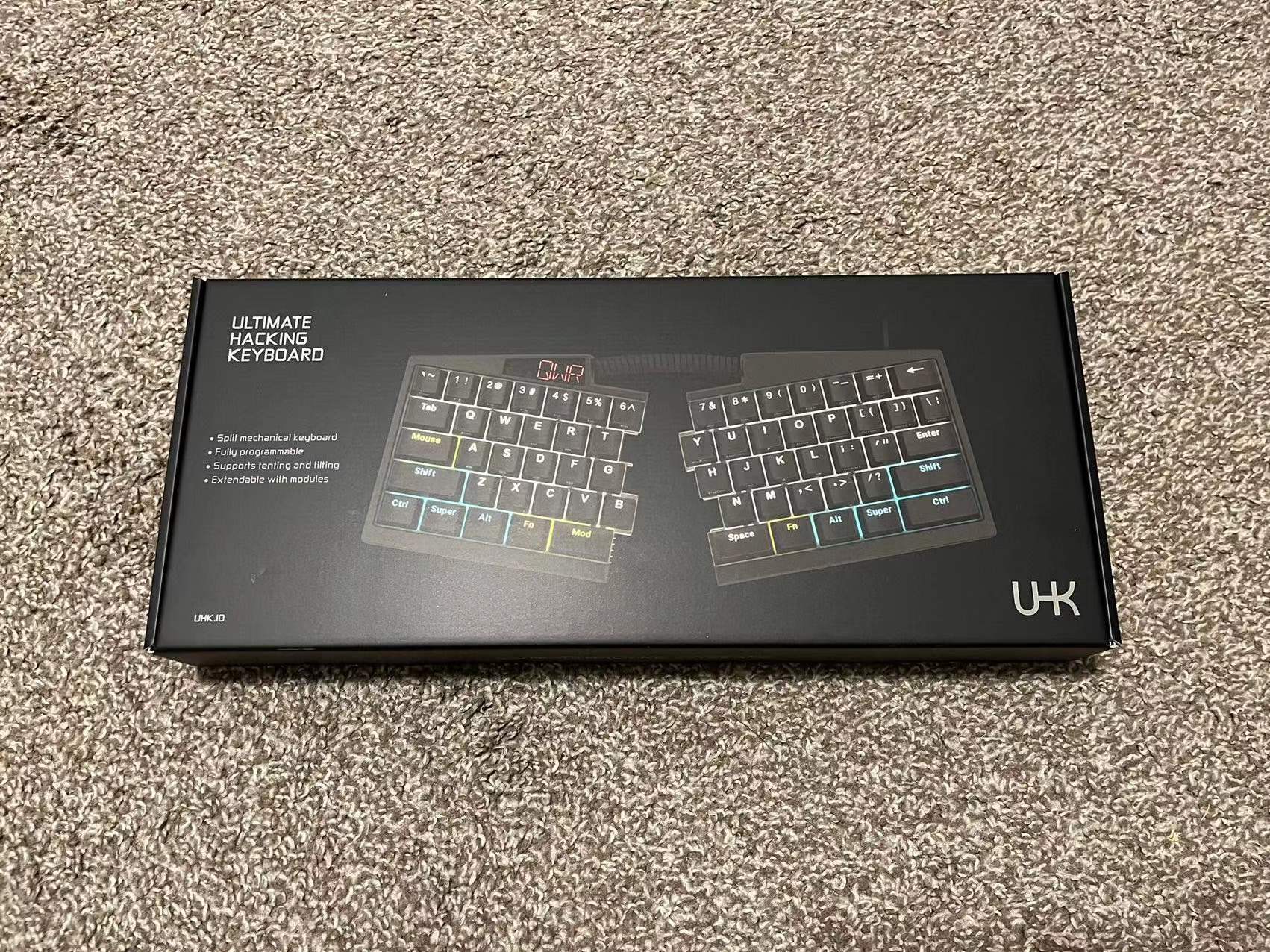
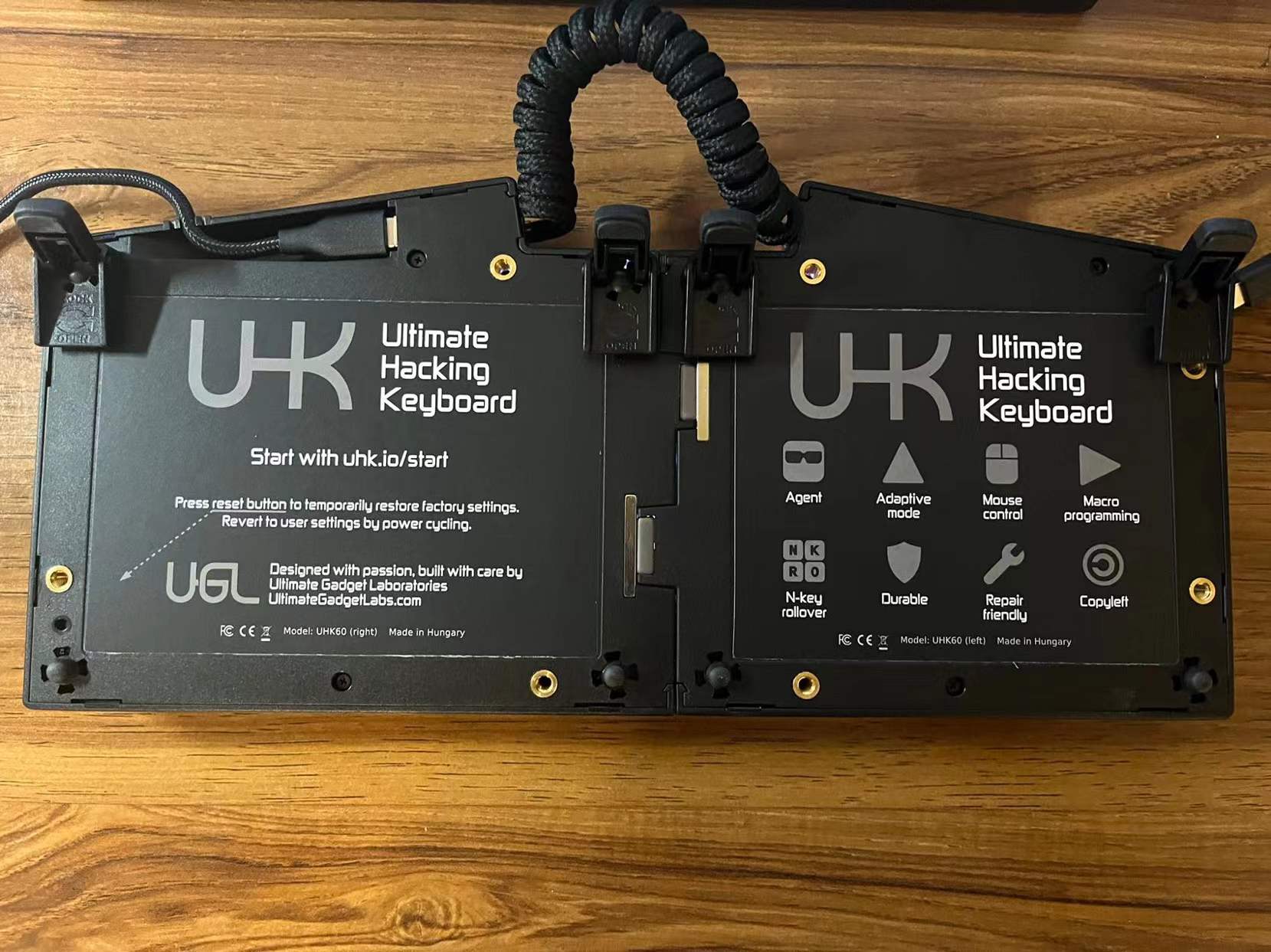
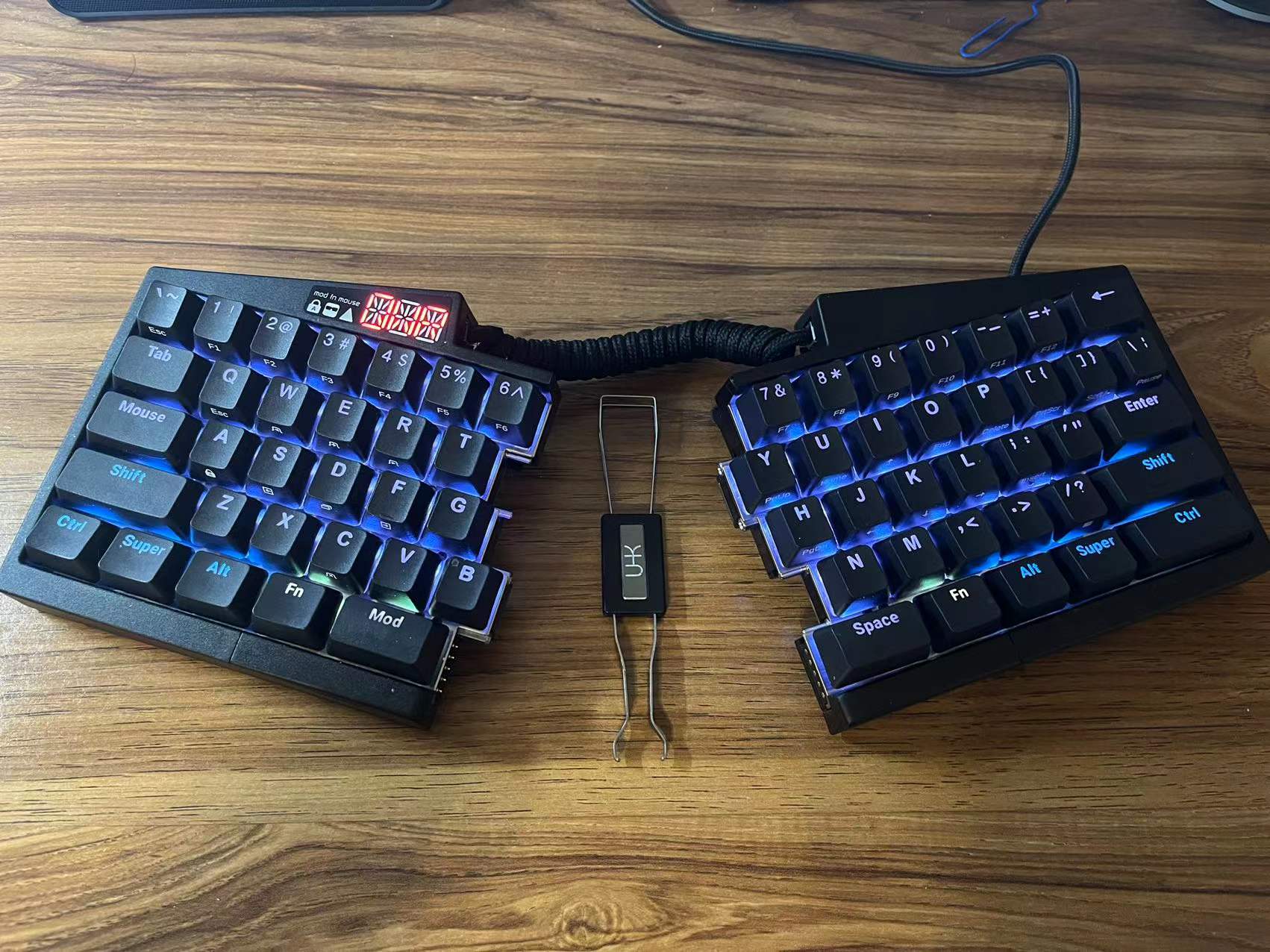
Many high end electronics like your iPhone are usually “Designed in USA,Manufactured in China”, but our two stubborn Hungarian engineers want to proudly put “Made in Hungary” on the back of their keyboards so they “successfully” manage to bring the supply chain back to Hungary or maybe Europe and manufacture everything from keycaps to IC boards locally. They are honest so when they say it they mean it. Unlike some luxury Italian shoe brands who manufacture shoes in China but lie to their consumers claiming their handmade products are “Made in Italy”. I’m always excited to try something exotic that is not “Made in China” but here is what happened and what they said on their blog:
- We’re releasing five different products (four modules and the UHK 60 v2). Every product has its own set of manufacturing challenges, and ramping up production is quite challenging even for a single product.
- We have quite a backlog, especially of modules that we need to fulfill. At the same time, the demand for our products has significantly increased recently.
- Our on-site, on-demand manufacturing operation is excellent when it comes to a steady stream of orders but not ideal for combating large backlogs. As a result, it takes more time to catch up than if we had an OEM in China.
- The electronics supply chain is a wreck due to Covid. We had to purchase several thousand ICs for the modules and the UHK 60 v2 for about ten times the price we usually pay, and we were told we’re lucky we could even get the parts.
Charge you 10 times the price you usually pay? That’s probably a scam. I guess they can tell me “Stop whining and you are lucky to get the latest version of UHK keyboard in a year not in five years.” I feel it is exactly what could happen if they want to bring the supply chain back to US to Make America Great Again! No offense but Hungary seems to be anomaly point in Europe in terms of their language, foreign policies, etc. A while ago I even saw their prime minister Viktor Orban on Fox News defending his values and policies for his country despite being labelled as an “authoritarian dictator” by all western European liberals but I don’t think he is someone who is stupidly patriotic and never mentioned in the show that he wants to bring the supply chain back to Hungary like they want in the US. Only judging from his one speech on the show, Viktor seems cool, intelligient with morals even though they unfairly compare him to Donald Trump because they are good friends and share some similiar ideas like on immigration issues lmaoo. Also, I doubt the UHK founder is a supporter of Viktor Orban and his more conservative policy because he mentioned he is a vegetarian riding bicycles as much as he can. I even asked the founder what the heck is going on here (in a more polite way) that you don’t outsource the manufacturing to China for massive production as everyone else does and you have to delay the delivery for so long like a year? Their reply is “We don’t know other keycap OEM who has such a good reputation in terms of quality…”
Oh shit what a shame poor China you always makes low quality products that fell apart after a month or two and earned the bad reputation you absolutely deserve! I know what you are thinking but it’s almost 2022 not in 2002 and check out the high quality Logitech (your Swiss counterpart) products that are made in China. If you can make some handmade high quality products in a local shop to preserve the craftsmanship I have no problem with that but I don’t think the material quality of your products are significantly better than my old cheap Logitech keyboard if not worse. I also have a UHK keyboard V1 and the quality is pretty solid even though I really can’t tell the difference between good plastic keycaps and bad ones but anyway I was very happy and satisfied with my first UHK product and ordered UHK V2 immediately after the announcement. Honestly your company will be kicked out of the business if you can only make 50 keyboards per month but Logitech enters the arena with products with similar design to compete with you. You may have patents for you design but a keyboard is not something that requires a lot of IPs.
Today I received the UHK keyboard V2 but to be honest the material quality is a disappointment that the difference is very noticeable because the new one seems to use some cheap materials and has a very coarse texture compared with the last UHK V1. Even my old $30 made in China Logitech keyboard feels better than the UHK V2 keyboard. The plastic feet that need to be installed on the back of the keyboard for tilting broke so easily when I use a little more force to lock it. The top parts of two halves also do not align perfectly (Not a big deal but I have OCD). I could be wrong if it turns out that the keycaps has way better durability to last 1000 years but I really don’t like the cheap feeling plastic used on UHK V2. Alright enough bitching and let’s talk about the good aspects of UHK keyboard and why I think it’s the best keyboard on the market from the point of view of a programmer. As a guy who always buy clothes in Costco, I actually don’t give a shit about the quality of some plastic boards, keycaps or even the swappable switches promoted by many mechanical keyboard ethusiasts. The colorful backlights, USB3 connection port on UHK V2 are nice to have but not really necessary. Damn then why do I even spend nearly $400 on UHK V2, which is not so functionally different from the old UHK V1 if I don’t care about the new features at all. Possibly it is still a good investment if I hold the UHK V1 for another two decades and sell it on eBay.
Oh wait, I forget to mention the most amazing feature of this keyboard is that this keyboard can be split into two halves connected by a telephone cable to increase ergonomics and customized modules like trackpad or track ball can be added to each half! The reason I forget to mention this great feature is I don’t separate them in my daily usage and only seperate them when I have to show it off to a friend. I type the letter B with my right hand index finger but unfortunately the letter B on UHK is located on the left half and I don’t have the patience to deallocate my old muscle memory. What a pity otherwise I would buy some trackpad modules to play around in the split mode. I even see some tweets in which a dude put two halves on the belt next to the thigh and stand in front of his laptop to work but not for me because I don’t want to type letter B with my left hand lol.
Basic usage with my configuration for each layer
The UHK keyboard has four different layers: Base, Mod, Fn and Mouse. The press of a key under different layer will have different effects and the key mapping is fully programmable in their open source software. If you double click the layer key like Mod, Fn or Mouse, the layer is locked and you don’t have to press and hold the layer key when you trigger another key under this layer. The UHK keyboard configuration software is a NodeJS application so they also put a web demo online to let you experience how to configure the keyboard.
Use Base layer
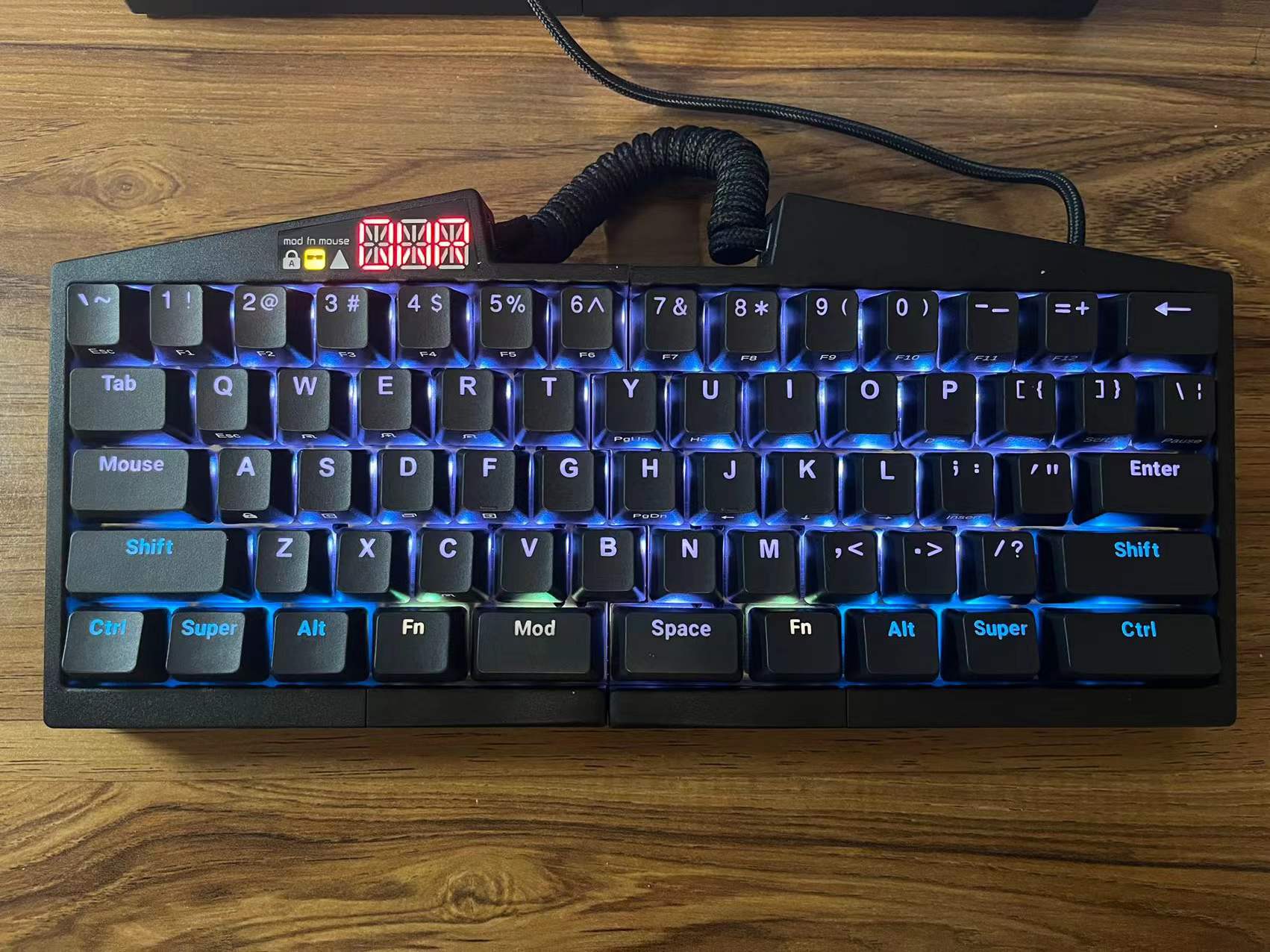
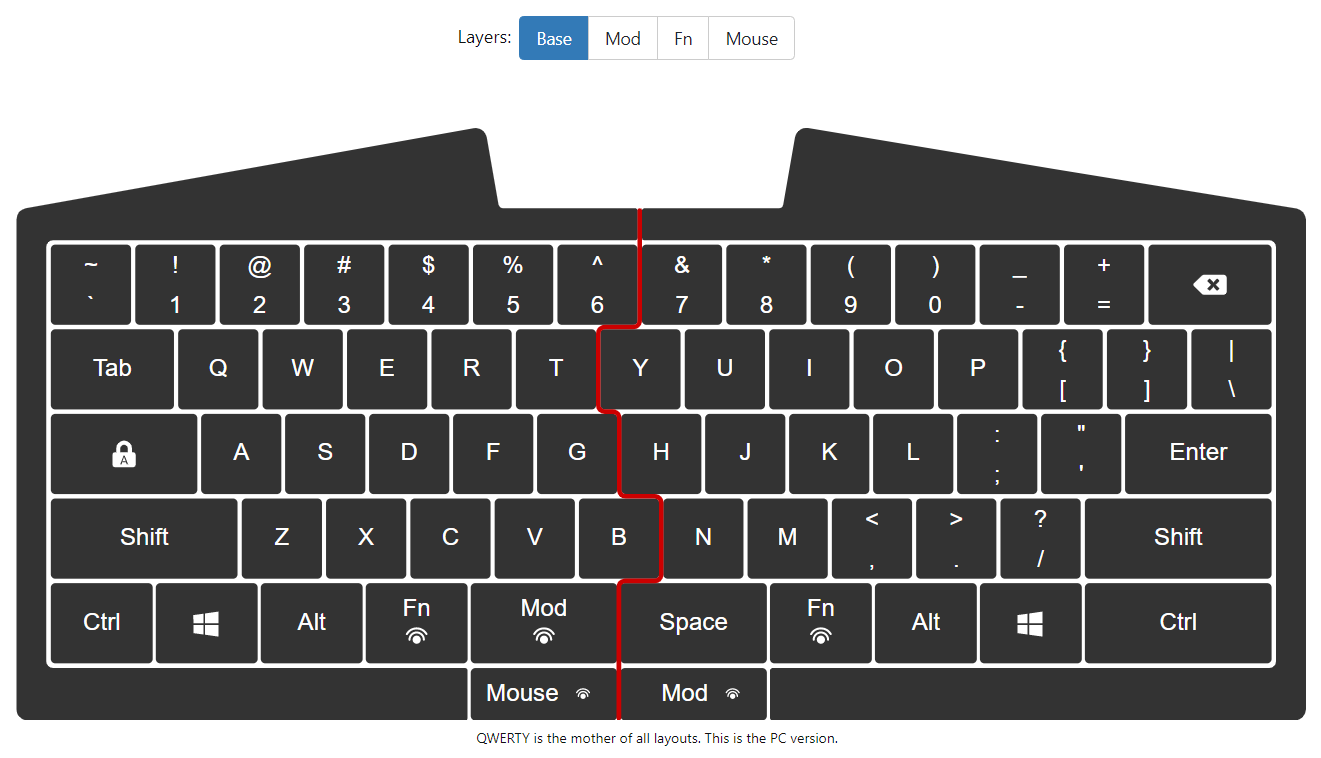
The Base layer is just the normal layout except UHK keyboard splits the space key into two halves and has two additional keys Mod and Fn at the bottom line to switch between layers. This design is game changing because the position of two additional keys are naturally positioned under your left thumb and you will never have to lift your hand like the way you hit Ctrl with your little finger when you have to do every five seconds in Emacs editor. Note you have another two hidden additional keys below the space key so you can map them to other keys and I make one of them as the switch key for Mouse layer because by default they replace the Cap key for the new Mouse key and I don’t like it.
Use Mouse layer
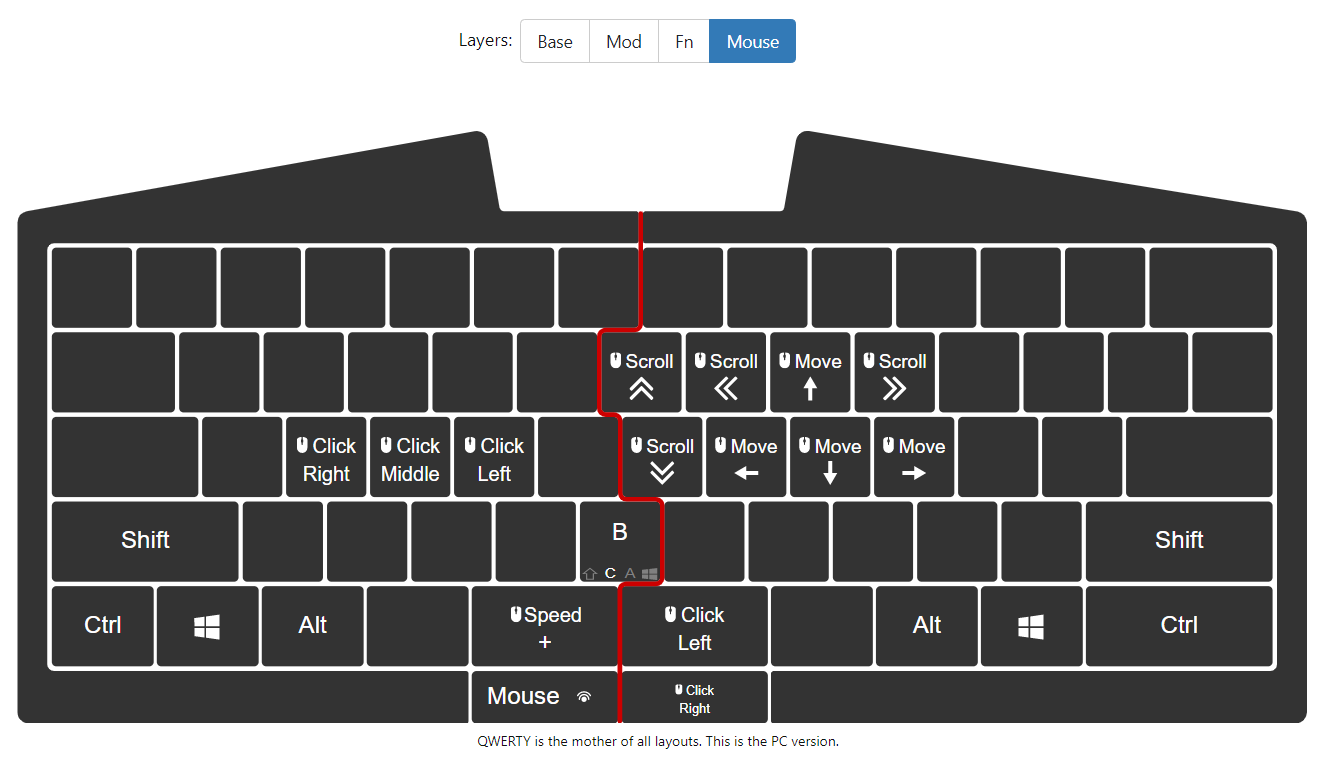
This Mouse layer really blows my mind that you literally have a mouse in your keyboard that some mapped arrow keys are used to move around the cursor and key S and F emulate the right click and left click in the mouse mode. As shown in the picture below, other keys are mapped to some less used mouse actions to scroll up and down. There is even another key to change the moving speed of your mouse too and the default speed can be set up in the configuraton software. Fantastic!
Use Mod layer
The Mod layer is definitely the most important layer that you will use a lot to speed up your workflow.
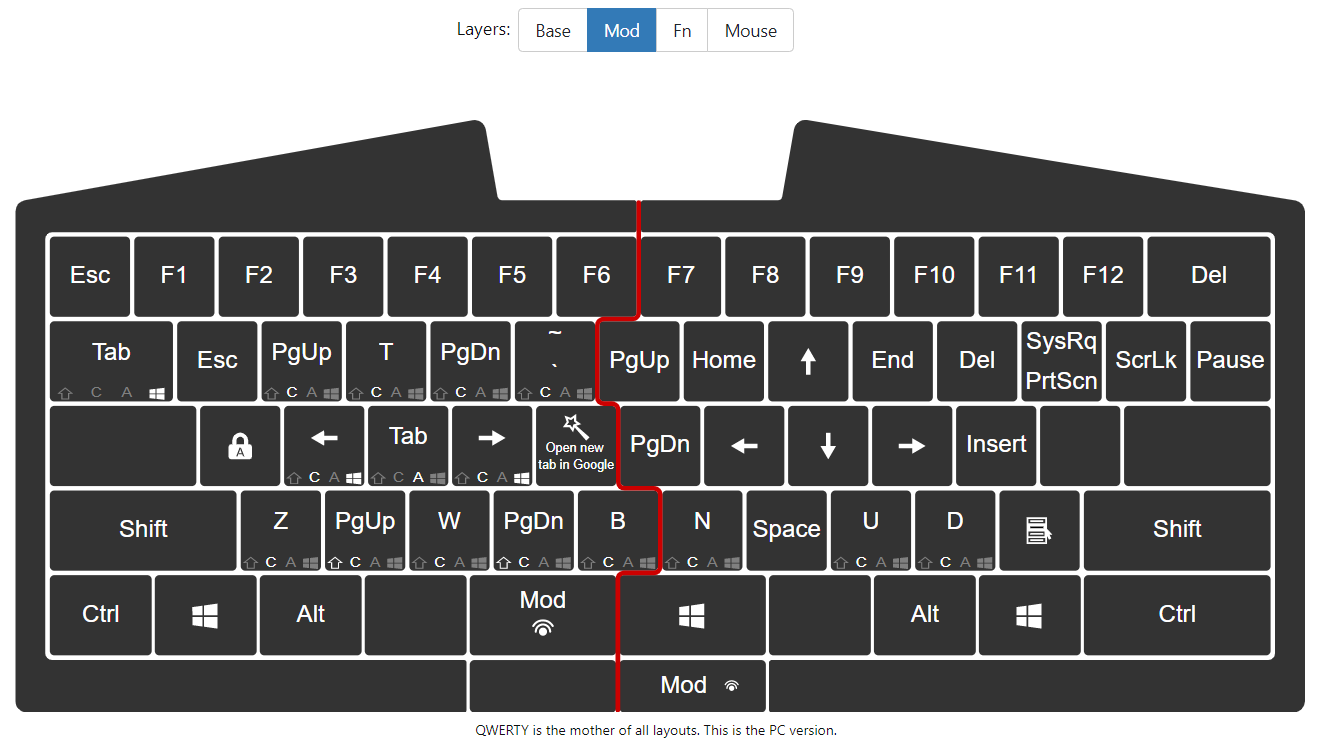
Arrow keys remapping - Do you notice that there are no arrow keys on the keyboard? It’s like using Vim directly on your keyboard that
J,L,K,Iare mapped toLeft,Right,DownandUpwhen you pressing down theModkey.Escis mapped toMod + Qand now you don’t have to stick out your left little finger to reach upper left corner that seems to be a mile away or buy aEscfoot pad to code with your foot included like playing piano.Browser navigation - Most works are done in the browser these days so shortcuts to move around tabs save us a lot time. Do you still click the plus sign to open a new tab? If you still do then you are so out of date. Below is the mapping on
ModlayerMod + Emaps toCtrl + Tto open a new tab.Mod + R/Wmaps toCtrl + PgUp/PgDnto move to next or previous tab.Mod + Cmaps toCtrl + Wto close the current tab.
Windows navigation - Life feels much better if you can quickly switch between apps and windows.
Mod + Dmaps toAlt + Tabto switch between apps in the current window.Mod + Tabmaps toWin + Tabto bring all apps and windows to the front. You can add a new window or drag an app to a different window.Mod + Smaps toWin + Ctrl + LeftArrowto move to the previous window. If I don’t have this mapping, I have to press four keys on the UHK keyboard at the same time.Mod + Fmaps toWin + Ctrl + RightArrowto move to the next window.
Bring up terminal in VSCode by mapping
Mod + TtoCtrl + ~and if you have more than one terminal then you can use the sameMod + R/wmapping in browser navigation to switch between terminals. UseTmuxif you want to have multiple shells opened in one terminal window.
Use Fn layer
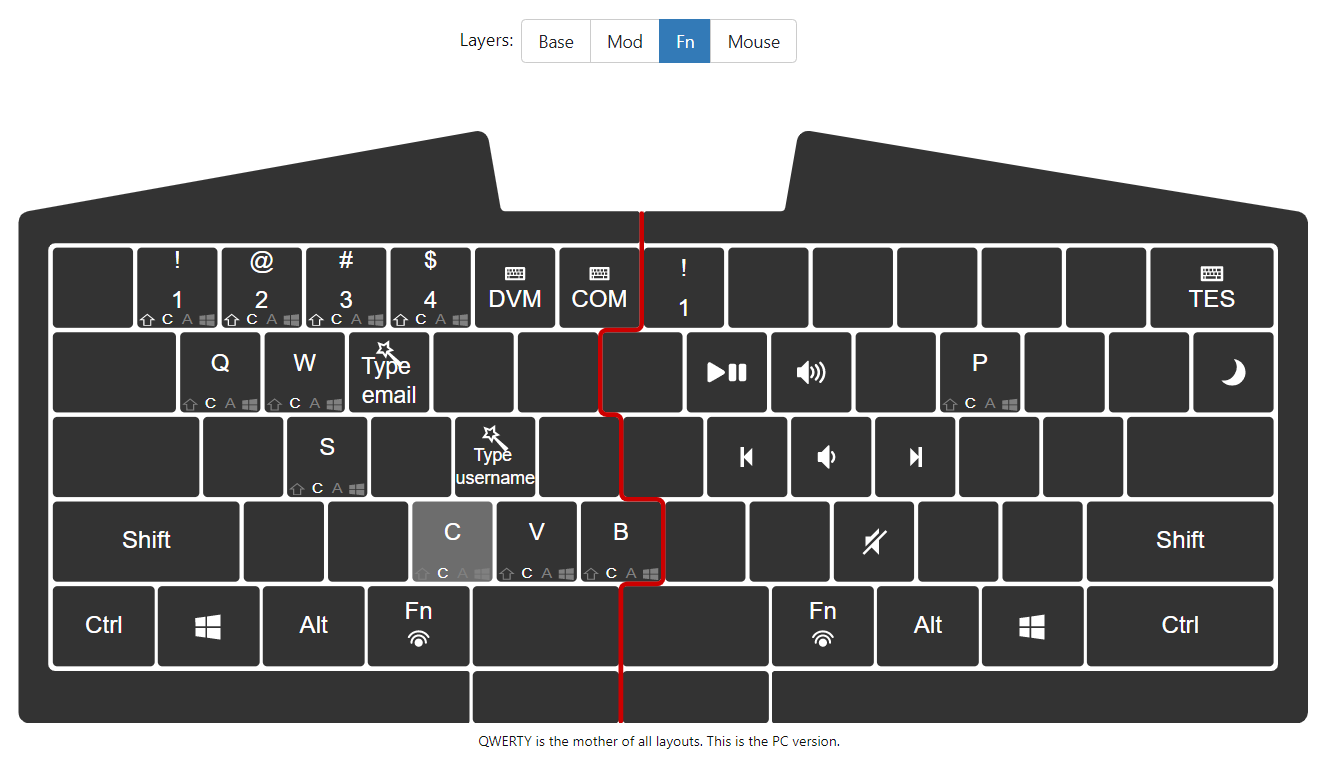
If the Mod layer is not enough for you to map all the shortcuts you want, don’t worry we have another layer called Fn layer to help you and by default a lot of media control shortcuts are mapped to this layer.
Media control shortcuts - Just take a look at the picture below and you know how convenient it is to turn up/down the volume, mute the volume, stop/resume or play the previous/next song.
Ctrl + CandCtrl + Vare mapped toMod + CandMod + Vbecause obviously no one wants to touch theCtrlkey when typing.Switch between containers in Firefox - you may wonder what is that mapping on the num keys?
- By default they are used to switch between different keyboard layouts and most people just use the
QWERTYlayout. I have no idea who use the other layouts but the key mapping could be a little different on MacOS so you may still want to keep one more layout and useFn + numberto switch between Windows layout and MacOS layout. - I map the number key in this layer
Fn + numbertoCtrl + Shift + numberto use Firefox Multi-Account Containers so I can quickly open a session in a different container. It’s a great browser addon for people who want to keep parts of their online life seperated into color-coded tabs. Imagine if you are a SDE at daytime and a porn star on Onlyfans at night. With this addon you never have to worry about the disaster when you accidentally post a tweet of your ass on your main twitter account to embarass yourself in front of all your coworkers and family.
- By default they are used to switch between different keyboard layouts and most people just use the
Advanced Usage
The advanced usage is not fixed or written in a user manual. The UHK keyboard is highly extensible in both hardware and software. You will have to keep expanding your knowledge about this keyboard and add more customization driven by your endless curiosity just like with Vim.
Switchable hardware
I would leave this part blank here for now until one day I want to try different customized hardwares like modules and switches.
Palm rest - I also bought the wooden palm rest and I can tell the two pieces of wood are made of high quality material judging from the weight and texture but unfortunately I decide not to use them because they take too much space on my desk and are not really necessary.
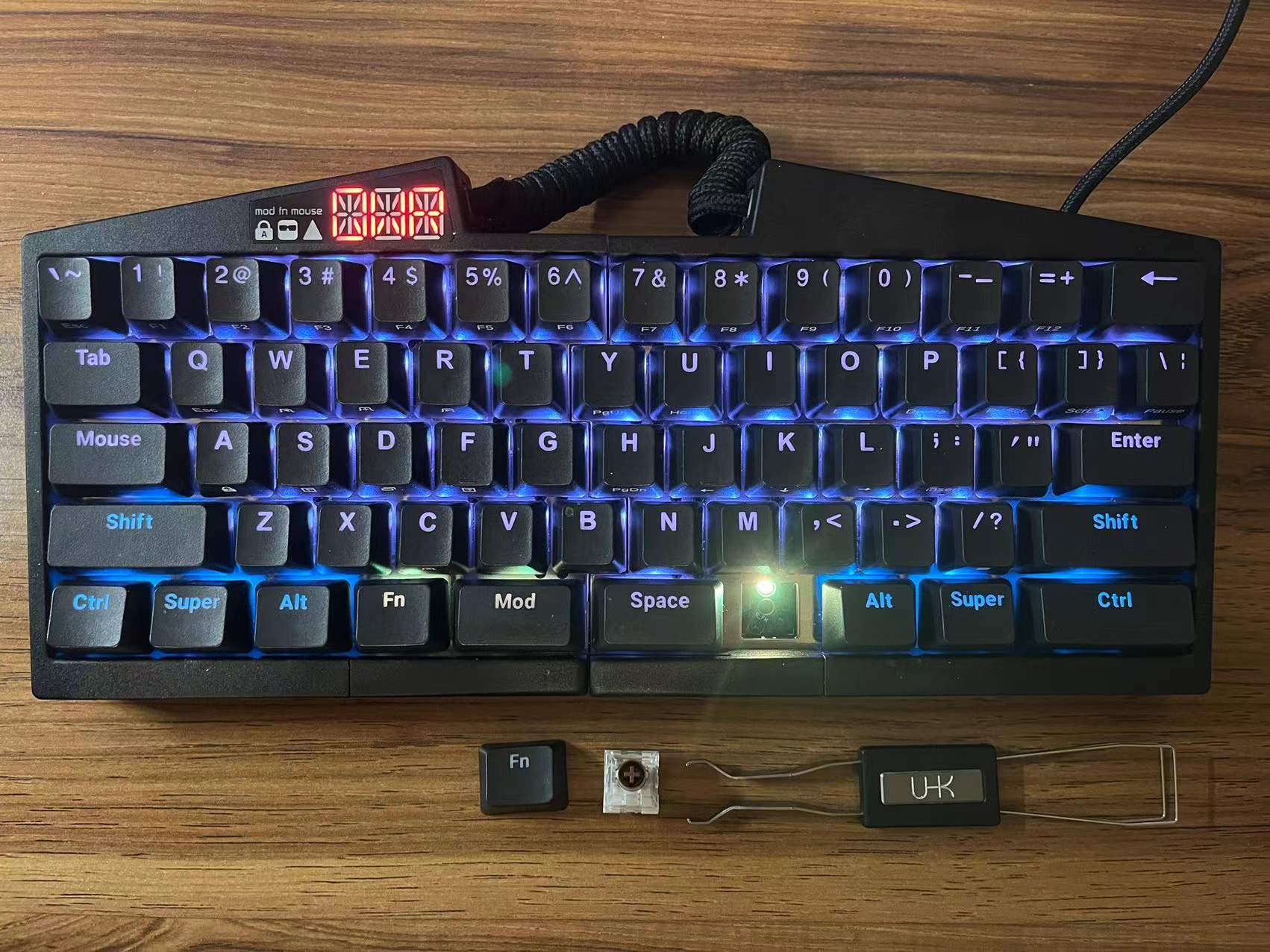
Switches and keycaps - The keycaps are switchable in both UHK V1 and UHK V2 but swappable switches are a new feature in UHK V2. I’m clueless about different switches and simply chose the switches with lowest noise.
Modules - Some really fancy stuff! If you prefer to use UHK in split mode then go buy some modules like trackball or trackpad to play around. You can also design your own modules and plug it in. I’m thinking about adding a Yubikey or Raspberry Pi Zero as a new module if I get too bored one day.
Macros
I’m not bold and creative enough to have the vision that a keyboard could have the same concept of Macro as in many programming languages. This is the feature UHK really surprised me. The basic idea of keyboard Macro is that a mapped key in one of the layers can trigger a series of pr edefined actions including key actions, mouse actions and delay.
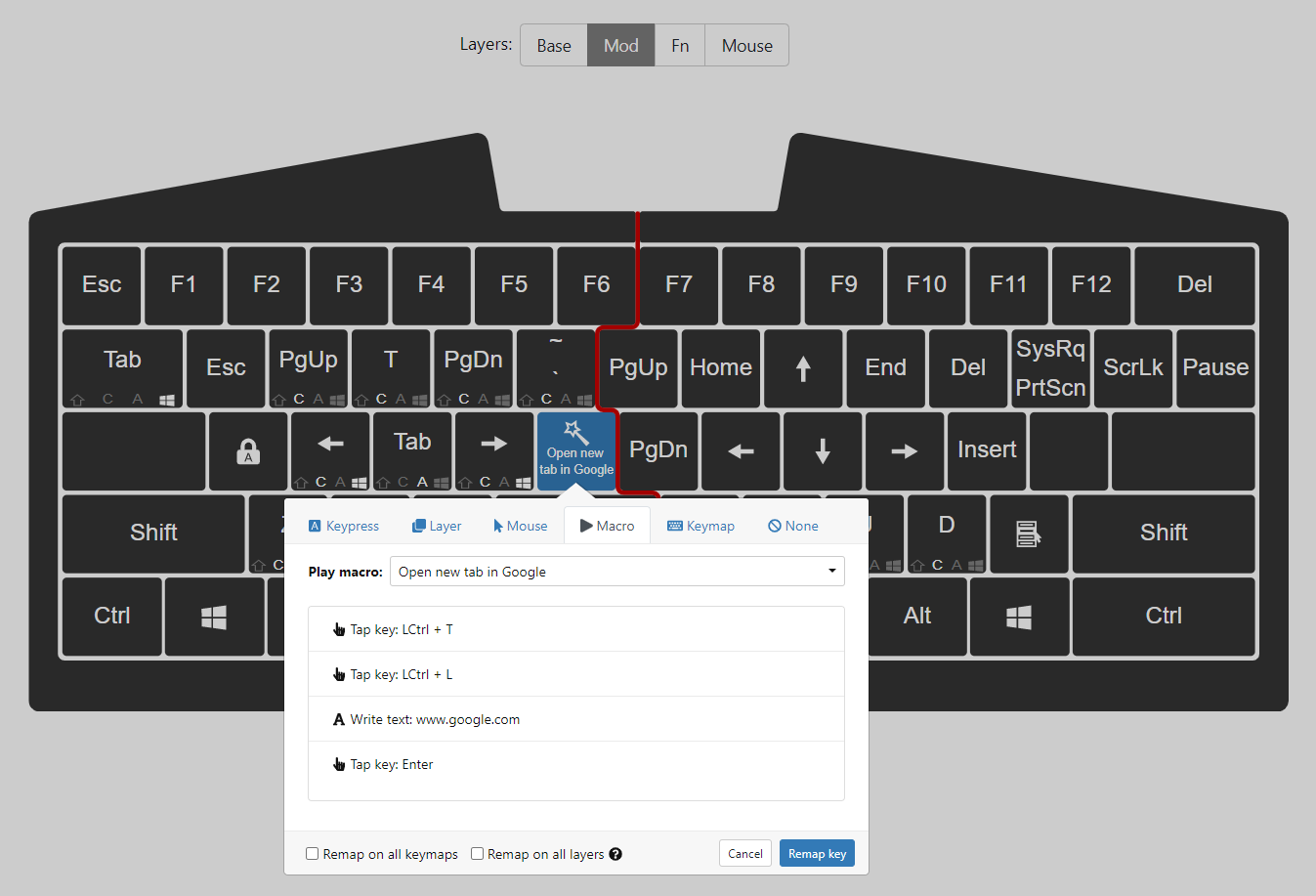
The simplest keyboard Macro is to map a key and let it type some long text without actually typing it such as your email address, home address or username (don’t do it with password for security reasons). For example, I use
Fn + Eto type my email address.My default search engine is DuckDuckGo but sometimes I still want to use Google to see if it can give me better results. When you are focusing on the browser,
Mod + Gwill trigger four actions:Ctrl + Tto open a new tab in the browserCtrl + Lto select all content in the URL- Enter the url https://google.com
- Hit
Enterto open the web page.
A funny story about keyboard
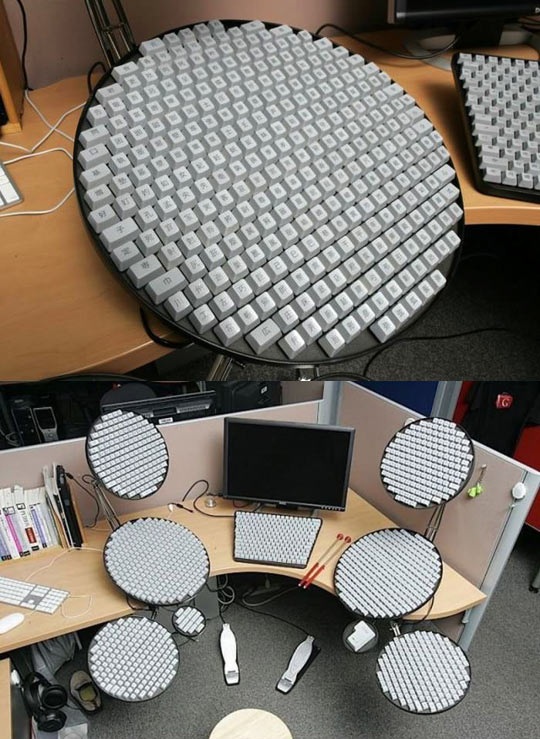
I showed my new UHK keyboard to someone who is actually from Hungary and he is proud that there is such a cool nice “Made in Hungary” product out there but he asked me “Do they also produce a Chinese version UHK keyboard?” At first I was very confused about what’s exactly a Chinese version keyboard and I never heard about it before then I realize he might think I have a secret gigantic keyboard with thousands of keys set up in my home and I type Chinese characters like a drummer as shown in the meme picture below.
A while ago a restaurant owner was also very curious about how the Chinese characters are typed into the computer system when he saw me typing Chinese characters on my phone so quick like a god. I told them the characters are typed by their pronunciation using Pinyin to spell the sounds. I never thought it’s a great invention and take it for granted until I watched a popular Youtube video How China Conquered The Keyboard well documented by a western guy and realized the Pinyin system is so crucial to connect China to the western world especially in the fields of tech and science. Otherwise you either have to keep isolating yourself from the rest of the world or change your language with Romanization like the Vietnamese or Turkish language even though some of those Romanized languages are still alphabet-based languages. Unconsciously, the Pinyin input method is also the starting point of the application of Artificial Intelligience because as early as in 80s and 90s the Chinese Pinyin input method can predict the next characters, words or even a whole sentence for you to choose from while in the English world we started to have such feature maybe in 2020? I think at some point Outlook and Gmail also support auto-complete and auto-correct of sentence I write but this feature is added very recently no earlier than two years ago but the tech world is moving forward fast that now we even have Code Pilot in VSCode to complete our code.
Conclusion
I said at the beginning that it’s the best re-progammable keyboard but in reality the best thing does not exist and not for everyone. There are always trade-offs but I would say UHK is very close to perfection depending on what you expect from a keyboard. If you like Vim you will like this keyboard to switch between layers with more customized functionality. I think the split of Space key into 4 keys (two Fn keys, one Mod key and one actual Space key) is game changing because you don’t even have to lift your palm or other fingers when the layer switching keys like Mod and Fn are naturally positioned under your left thumb. I start to question why do we even need such an awkwardly long Space key in most keyboards in the first place and who invented this?
The disadvantages of UHK includes the obvious cheap plastic material of UHK V2 made in a shitty factory in Hungary or somewhere in Europe that right now I’m switching back to my old UHK V1 and OMG the old keyboard feels way much better and smoother. Luckily, the keycaps and switches are both swappable so I will find better alternatives to replace them in the future. The other disadvantage is that UHK is a small company with a stubborn engineer who makes very slow progress with poor management on the supply chain. If you want to have a wireless Bluetooth UHK keyboard, you’d better prepare yourself to get it in 2032 even though the founder had this feature on his mind for years and most of the modern mechanical keyboard brands already have the wireless version since 5 years ago.
Maybe I’m a little too naive and unappreciative but do you really need more than two months to figure out how to add a very mature protocol like Bluetooth on your keyboard to communicate with your computer? Maybe the UHK engineer is secretly working on a nuclear powered battery that does not need to be charged again? I would love this feature to be added to my future UHK Bluetooth keyboard and cellphone!
Overall, the UHK keyboard is a great product and I did not find any other keyboards that achieve the same level of customizability and solid quality on the mechanical keyboard market despite the shitty materials used in UHK V2 is a little disappointing. If you want to use QMK firmware to design your own keyboard with more functionality like I did, most likely you will still end up buying a UHK keyboard if you’ve done enough research to find this hidden gem. I really appreciate the great efforts UHK engineers put into this product and this keyboard is no doubt an art piece. I would like to sponsor the UHK founder on Gofundme for a top MBA program so he can figure out the supply chain and manufacturing:)