Given a rows x cols screen and a sentence represented by a list of non-empty words, find how many times the given sentence can be fitted on the screen.
Note:
A word cannot be split into two lines. The order of words in the sentence must remain unchanged. Two consecutive words in a line must be separated by a single space. Total words in the sentence won’t exceed 100. Length of each word is greater than 0 and won’t exceed 10. 1 ≤ rows, cols ≤ 20,000.
The character'-' signifies anemptyspaceonthescreen.
Solution
Failed Solution
This method is intuitive and solve the problem but exceeds time limit for example like ["a", 20000, 20000] as it uses words in sentence to scan all positions in all rows and columns.
publicintwordsTyping(String[] sentence, int rows, int cols) { intx=0, y = 0, i = 0, len = sentence.length; int[] words = newint[len]; // Return 0 immediately if word length exceeds columns. for(int m=0; m<len; m++) { intlength= sentence[m].length(); if(length > cols) return0; words[m] = length; }
while(y<rows) { intwlength= words[i % len]; if(wlength > cols - x) { x = 0; y++; } if(y == rows) break; // Add dash sign between words except x when reaches end of row. x += wlength; if(x < cols) x++; i++; } return i / len; }
Improved Solution
This method concatenates all words into a long string and use the last column to match the position start % l in long string. If current position is empty char, then all words before position start % l is matched in current row, otherwise move back to the last previous empty char.
Posted onEdited onInLeetcodeWord count in article: 692Reading time ≈3 mins.
Introduction
Given a positive integer n, find the number of non-negative integers less than or equal to n, whose binary representations do NOT contain consecutive ones.
1
2
3
4
5
6
7
8
9
10
11
12
Example1: Input: 5 Output: 5 Explanation: Here are the non-negative integers <= 5 with their corresponding binary representations: 0 : 0 1 : 1 2 : 10 3 : 11 4 : 100 5 : 101 Among them, only integer 3 disobeys the rule (two consecutive ones) and the other 5 satisfy the rule.
Note: 1 <= n <= 109
Solution
A naive solution to check all numbers smaller or equal to n won’t work as it will give you TLE (Time Limit Exceeded) error on leetcode Online Judgement. Here I use dynamic programming method to recursively search solutions.
First of all, Compute cache[] like Fibonacci sequence, cache[i] means the number of Non-consecutive integers without consecutive ones for all integers of length i in its binary form. For example, cache[1] = 2 for both 0 and 1, cache[2] = 3 for 00, 01 and 10, cache[3] = 5 for 000, 001, 010, 100 and 101, so cache[i] = cache[i-1] + cache[i-2], because if the most significant digit of number in length i is 0, then the remaining i-1 digits have cache[i-1] Non-consecutive integers without consecutive ones. If it is 1, then the second most significant digit must be 0 to avoid consecutive ones, thus the remaining i-2 digits have cache[i-2] Non-consecutive integers without consecutive ones. Before we solve the problem, cache[] array can be pre-computated for future use and save some time.
Secondly, I came up with a equation to recursively find the solution. Given a number num, we define a function find(num) that equals to the number of Non-consecutive integers without consecutive ones, which are either smaller or equal to num. d[r] is used to denote the digit in position r. For a number in binary format like 11001, d[3] = 1, d[2] = 0, etc. We also define a new function rm2() to remove first two digits in binary form like from 110100 to 000100 by using mask to calculate 110100 & 001111.
$$
find(num)=
\cases{
find(rm2(num)) + cache[r], & \text{if second most significant digit is 0.} \cr
cache[r-1] + cache[r], & \text{otherwise}
}
$$
For example num = 11011, Use bit shift operation to find the position of most significant digit is r = 4, which is the same as the length of remaining digits without most significant digit. One part of the sum is the number of Non-consecutive integers without consecutive ones, which are less than num and d[r] = 0, is equal to cache[r]. The other part is the sum for cases when d[r] = 1, then the next digit of all integers must be 0 and there are two different conditions to consider: * For number numd[r-1] = 0, add find(rm2(num)) as we try to find all Non-consecutive integers without consecutive ones between 10000 and 10011, which is exactly equal to find(rm2(num)). * For number numd[r-1] = 1, add cache[r-1] as we try to find all Non-consecutive integers without consecutive ones between 10000 and 10111.
Posted onEdited onInLeetcodeWord count in article: 717Reading time ≈3 mins.
Introduction
Given a set of words (without duplicates), find all word squares you can build from them.
A sequence of words forms a valid word square if the kth row and column read the exact same string, where 0 ≤ k < max(numRows, numColumns).
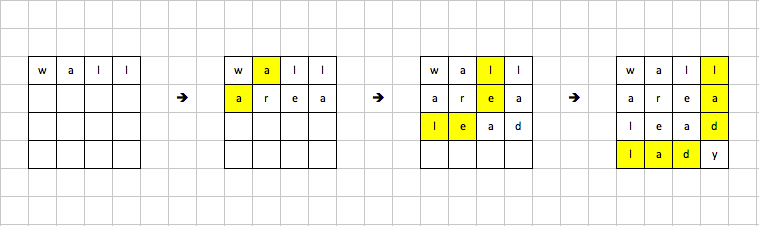
For example, the word sequence ["ball","area","lead","lady"] forms a word square because each word reads the same both horizontally and vertically.
1
2
3
4
ba l l ar e a l e a d l a d y
Note: There are at least 1 and at most 1000 words. All words will have the exact same length. Word length is at least 1 and at most 5. Each word contains only lowercase English alphabet a-z.
Trie Tree
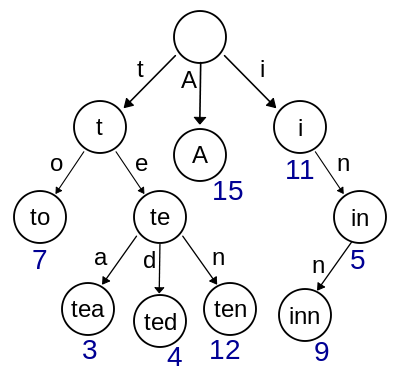
Trie Tree is a data structure used to quickly find all elements with same prefix in O(log(N)) time. Each node in Trie tree represents a prefix and all of its children are also Trie node and represents a prefix that starts with prefix in parent node and extends with one more character. It’s faster to search for strings with a specific prefix than check the prefix of each string in a brute force method.
The basic idea is to try every string in the list as the first string in word square, then prefix of the second string in word square is determined by the second character in first string. We search it in our Trie tree to find all strings with this prefix and apply each one as the second string in word square. When two strings are placed in word square, then the prefix of third string is determined by the third character of first and second string, then search Trie tree for all strings that meet the requirement. Repeatedly search for strings with new computed prefix until the word square is filled up. For this kind of backtracking problem, a recursive method that invoke itself is much easier to implement and more understandable than using stack or queue to search for an answer.
It perfectly passed all tests with clear logic, but doesn’t have a good running time, because TrieNode tree does not cache a list of strings for specific prefix, so they will be calculated every time, but makes memory usage at minimum and will not cause memory explosion if input string list is very large. Also, there are many deep copies of string list in search() function, which may further slow down the program.
public List<List<String>> wordSquares(String[] words) { List<List<String>> result = newArrayList<>(); // Deal with corner case when only one word in list. if(words.length == 1) { List<String> list = newArrayList<>(); list.add(words[0]); result.add(list); return result; }
TrieNoderoot= init(words);
for(String word : words) { List<String> list = newArrayList<>(); list.add(word); search(list, root, result); } return result; }
Posted onEdited onInLeetcodeWord count in article: 506Reading time ≈2 mins.
Introduction
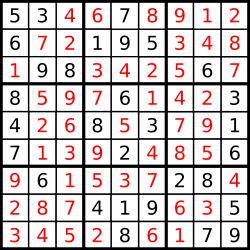
37. Sudoku Solver Write a program to solve a Sudoku puzzle by filling the empty cells. Empty cells are indicated by the character ‘.’. You may assume that there will be only one unique solution.
Sudoku problems can be solved with backtracking strategy by trying all possible options for each empty cell, while a new assignment will further constraint its adjacent cells. The solution here uses a extra function findNext() to determine the next empty cell to fill, which has the least options under current constraints, then function solve() will fill one empty cell with some value and try to recursively solve the sub-problem until all cells are filled or no solution is found. Theoretically, this solution should be faster than a naive solution trying to randomly fill cells without any heuristics, because it always starts from a cell with least options, thus reduce the branches in search tree, but actually it doesn’t appear to be fast as heuristic calculation introduces some overhead and too many List and Set operations here are time-consuming. I’m too lazy to change them back to simple array operations.
classSolver { // Find next empty slot with largest constraints. Time complexity is O(m^2). publicint[] findNext(char[][] grid, List<List<Set<Character>>> state) { intmin=9; int[] loc = {-1, -1}; for(int i=0; i<9; i++) { for(int j=0; j<9; j++) { if(grid[i][j] == '.' && state.get(i).get(j).size() < min) { min = state.get(i).get(j).size(); loc[0] = i; loc[1] = j; } } } return loc; }
// Create board state based on new board layout. Time complexity is O(m^3). public List<List<Set<Character>>> getState(char[][] board) { List<List<Set<Character>>> state = newArrayList<>(); char[] charArray = {'1', '2', '3', '4', '5', '6', '7', '8', '9'};
Posted onEdited onInLeetcodeWord count in article: 1.6kReading time ≈6 mins.
Introduction
There are four similar problems about range sum in leetcode: 303. Range Sum Query - Immutable Immutable version doesn’t have update operation. 307. Range Sum Query - Mutable Given an integer array nums, find the sum of the elements between indices i and j (i ≤ j), inclusive. The update(i, val) function modifies nums by updating the element at index i to val.
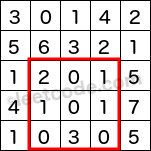
304. Range Sum Query 2D - Immutable Immutable version doesn’t have update operation 308. Range Sum Query 2D - Mutable Given a 2D matrix matrix, find the sum of the elements inside the rectangle defined by its upper left corner (row1, col1) and lower right corner (row2, col2).
The above rectangle (with the red border) is defined by (row1, col1) = (2, 1) and (row2, col2) = (4, 3), which contains sum = 8.
Immutable Range Sum
Immutable Range Sum (2D) problem can be solved by accumulating sum from index 0 to current index i in an additional array sum[], then it takes only O(1) time to calculate sum from i to j by simply doing sum[j] - sum[i-1]. The pre-computation of sum[] array in constructor takes O(N) time and never changes over time as there is no update operation.
For 2D Sum Range Problem, the basic idea is the same and we create an additional matrix to store sum in area (0, 0, i, j). Dynamic Programming can be applied here to avoid repeatedly calculate sum in previous areas.
/* It takes O(1) to sum but O(N) to update by pre-computing sum from * start to index i and storing results in a new array. */ publicclassRangeSumQueryImmutable { privateint[] sums; publicRangeSumQueryImmutable(int[] nums) { sums = newint[nums.length]; intsum=0; for(int i=0; i<nums.length; i++) { sum += nums[i]; sums[i] = sum; } }
publicintsumRange(int i, int j) { if(i <= 0) return sums[j]; return sums[j] - sums[i-1]; } }
The naive method to solve Immutable Range Sum doesn’t apply here as update operation will take O(N) time and make overall time complexity O(N) because update and sum operations are equally distributed.
Some data structure like Segment Tree and Binary Indexed Tree can have performance gain and make both update and sum operations to O(log(N)) with a little memory overhead.
Segment Tree
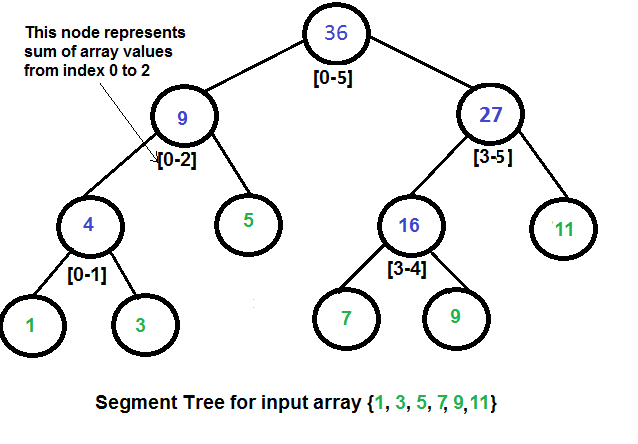
Segment Tree is basically a binary tree, in which the left node is left half subarray, the right node is right half subarray and the value of each node is the sum of left and right subarray. The root node contains the whole input array and we can recursively parse an array into two subarrays until the leaf node only contains one element.
Obviously it takes O(log(N)) time to update the value by adding the difference between old value and new value into corresponding segments in each level of the segment tree. If index i is about to be updated and i is between start and end of current node, then updateNode() method will add difference to the value of current node and recursively update its left and right node with same range check and update.
Sum operation is a little harder to understand than update operation. It searches from starting root node with O(log(N)) time and has three conditions below: * Query range is completely outside of node range, then return 0. * Node range is within query range, then return the value of this node. * Node range and query range is overlapped, then recursively search and sum on both left and right nodes with same range parameters i and j.
privatevoidupdateNode(SegmentTreeNode node, int i, int diff) { if(node == null) return; // Update current node with diff and recursively update its children. if(i>=node.start && i<=node.end) { node.sum += diff; updateNode(node.lnode, i, diff); updateNode(node.rnode, i, diff); } }
privateintsumRangeNode(SegmentTreeNode node, int i, int j) { if(node == null) { return0; } // Node range is completely outside of query range. // Either on left or on right without any overlap. if(node.end < i || node.start > j) { return0; } // Node within query range. elseif(node.start >= i && node.end <= j) { return node.sum; } else { return sumRangeNode(node.lnode, i, j) + sumRangeNode(node.rnode, i, j); } }
// Public function available to user. publicvoidupdate(int i, int val) { intdiff= val - nums[i]; nums[i] = val; updateNode(this.root, i, diff); }
// Public function available to user. publicintsumRange(int i, int j) { return sumRangeNode(this.root, i, j); } }
Binary Indexed Tree
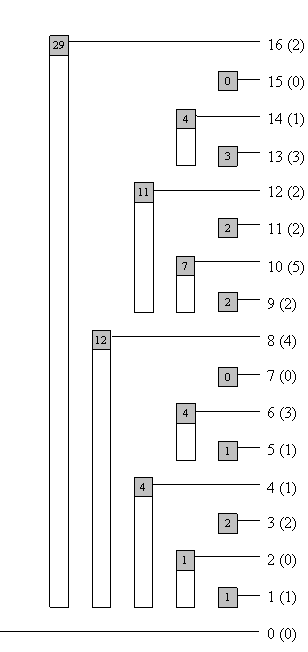
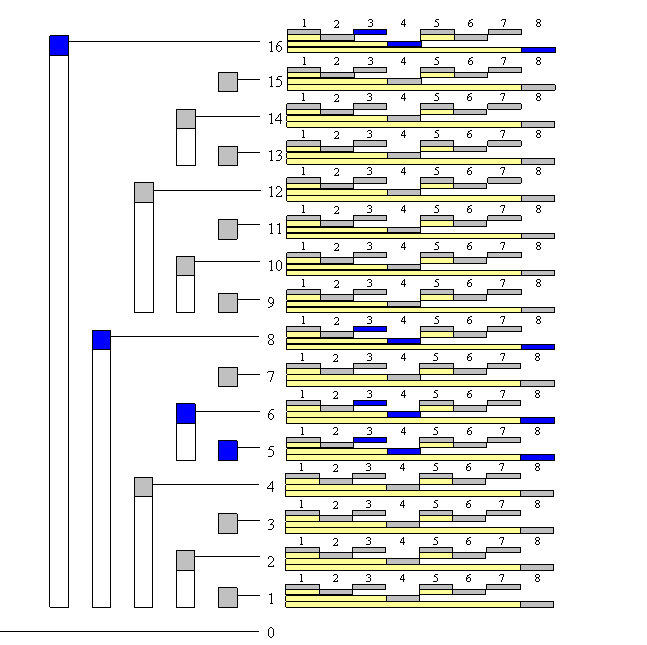
Binary Indexed Tree also known as Fenwick Tree is a data structure used to efficiently update elements and calculate prefix sums in number tables with O(log(N)) on both update and sum operations. It only uses an additional array with same length of input array to store its data structure and code of its implementation is deadly simple and short!
The basic idea is that any integer can be written in binary form as the sum of powers of 2. For example, 13 = 2^3 + 2^2 + 2^0. Let’s define input array as S[] and sum array as T[]. For each index idx in array S[], r is the position in binary form idx of the last digit 1 from left to right. In our example 13 = 1101, r = 3 and T[idx] is responsible for sums from 0 to idx - 2^r - 1 in S[] array, so S[0] + ... + S[1101] = T[1101] + T[1100] + T[1000]. The strategy here is to find the last digit 1, replace this digit with 0 and get the new index until the new index is all zeros. idx -= (idx & -idx) is used to isolate last digit 1 and get the next index in an amazingly simple way with less than 10 lines of code.
// BIT method Constructor publicBinaryIndexedTreeSumQuery(int[] nums) { this.maxVal = nums.length; // Ignore first index and set to 0. this.tree = newint[nums.length+1]; this.array = newint[nums.length+1]; for(int i=0; i<nums.length; i++) { update(i, nums[i]); } }
// Get sum from 0 to idx. publicintread(int idx) { idx++; intsum=0; while(idx > 0) { sum += tree[idx]; idx -= (idx & -idx); } return sum; }
// Public function available to user, update both original array and tree. publicvoidupdate(int idx, int val) { idx++; inti= idx; intold= array[i]; // Replace all segments containing index i. while(idx <= maxVal) { tree[idx] += val - old; idx += (idx & -idx); } array[i] = val; }
// Public function available to user. publicintsumRange(int i, int j) { return read(j) - read(i-1); } }
Move from 1D to 2D
This follow up question requires us to extend 1d Binary Indexed Tree to 2D version in the same manner. When we update position (i, j) with new value val. In inner while loop, consider each row as 1d Binary Indexed Tree and several positions at this row are updated with val starting from index j and backward to beginning. In outer while loop, index i decides which rows are updated as 1D Binary Indexed Tree starting from index i and backward to beginning as well. A read() function is needed to sum area from (0, 0) to (i, j) and this function is then used to to sum a random area by cropping out side areas from main area and adding overlapped area.
Posted onEdited onWord count in article: 125Reading time ≈1 mins.
Personal Blog Setup in Hexo
Install Hexo
Assuming the latest version of npm is already installed
Update dependencies
Use npm outdated to check which dependencies can be updated.
npm update only updates minor releases and if you want to change to major releases you need to either manually update each outdated dependency with npm install xxx.
Install a global package management tool with command npm install -g npm-check-updates and call ncu -u to upgrade all libraries to their latest versions. You may need to manually solve some dependency conflicts.
Run Blog Server in local environment
Run command hexo server and open localhost:4000 in the browser with /admin to edit posts or drafts directly in the browser with markdown preview.
In the interactive window, you can change pick before id to squash and it will squash it with previous commit.
If both commits modify the same line, then there will be a conflict as git does not know how to resolve it and you need to manually reset HEAD and continue.
1 2 3 4
git rebase -i HEAD~3 # When conflicts show up git rebase --abort git rebase --continue
Interactive window will be shown up to let you overwrite history
# Rebase 6fd4e43..59ca4d4 onto 6fd4e43 (7 command(s)) # # Commands: # p, pick = use commit # r, reword = use commit, but edit the commit message # e, edit = use commit, but stop for amending # s, squash = use commit, but meld into previous commit # f, fixup = like "squash", but discard this commit's log message # x, exec = run command (the rest of the line) using shell # # These lines can be re-ordered; they are executed from top to bottom. # # If you remove a line here THAT COMMIT WILL BE LOST. # # However, if you remove everything, the rebase will be aborted. # # Note that empty commits are commented out
Remove all history of a file containing sensitive data like API keys, bfg package needs to be installed first.
1 2 3
bfg --delete-files Rakefile # or git filter-branch --tree-filter 'rm -f passwords.txt' HEAD
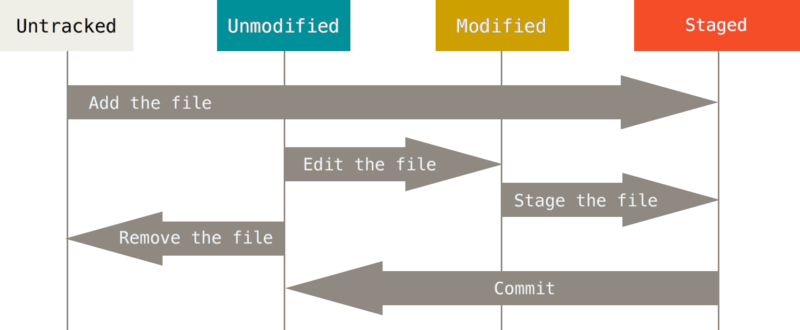
Unstage a staged file
1 2
# Reset single file to unstaged git reset HEAD filename
Combine several commits into one commit
1 2 3 4 5 6
# Reset HEAD to previous commit and it shows combined modified files git reset HEAD~3 # Reset to specific commit by 7-digit ID git reset 32dfs3e # Commit all changes from last several commits git commit -m "commit message"
Push and submit commits
Push a specific branch to a specific branch in remote
I have troubles when I’m editing codes and colleagues want you to pull and check their code. git stash command will save the current dirty working directory in stack and go back to a clean working directory matching the HEAD commit.
# Save current modifications into stack git stash git stash push
# Check all stashes on the stack git stash list
# Apply saved modifications back to recent commit git stash pop git stash apply
# Restore a dropped stash if you can find the hash from your command history git stash drop git stash apply abcdef12356
# Clear all stashes git stash clear
# Create new branch from saved stash git stash branch <branchname> <stash>
Reset, Revert and Cherry Pick
git reset - Remove changes in the current commit or several recent commits.
git revert - When a bug is found in a previous commit and you want to reverse that change as a hot fix and the bug stays in the history until the commit that reverts it. Use git revert -n (--no-commit) <commit-hash> to automatically generate commit message.
git cherry-pick - In the situation when you and your teammate work on different branches and you need some of the newest code from his branch to work on, you can use git-cherry-pick to pick a commit from him and add it to your HEAD.
Git restore and Git remove
Restore and remove some changes:
1 2 3 4 5
# Unstage files git rm --cached files git restore --staged files # Restore the unstaged files that are deleted or modified. git restore files
Git submodule
1 2 3 4 5 6 7
# Clone repository and submodules recursively
git clone --recurse-submodules
# Pull all submodules into subfolders recursively if submodule also has submodules
git submodule update --init --recursive
# Update submodule when you want to pull updates from submodule.
git submodule update
git submodule sync
If you want to remove a submodule and add a submodule with the same name then there are extra steps to clean the mess: * In file .gitmodules - delete links to submodule (whole section with submodule name) * In file .git/config - delete links to submodule, as in previous step * In folder .git/modules - delete folder with relative path similar to relative path of “problem” module * In folder /<module> - delete the whole initialized submodule folder or use git module deinit